

| Symptom | Likely Cause | What to Check | Typical Fix Cost |
|---|---|---|---|
| Shuts off after a few minutes | Overheating from blocked filters | Pre-motor & exhaust filters | Very low |
| Loud/strained sound before shutdown | Brush roll drag | Hair-wrapped brush or failing bearings | Very low–Low |
| Weak floor suction but strong hose suction | Lower hose clog | Clear lower hose with dowel | Very low |
| Shuts off again after cooling | Persistent airflow restriction | Hose, base channels, cyclone dust | Very low–Low |
| Continues shutting off after cleaning | Thermal protector or motor wear | Technician inspection | Mid–High |
Why Bissell Vacuums Suddenly Turn Off Mid-Clean
Most modern Bissell uprights and pet models have a thermal protector that cuts power when the motor gets too hot. The motor is not usually bad. The machine is protecting itself from low airflow caused by blockages or neglected filters.
Bissell’s support guidance for models like the Pet Hair Eraser Turbo and PowerGlide Pet explains that an internal shutoff activates when filters or hoses clog, and they instruct owners to let the unit cool before restarting.
Repair shops commonly see this on the CleanView Swivel Pet, CleanView Rewind Pet, PowerLifter Swivel, and SurfaceSense Pet series. The pattern is similar: normal suction at first, then a loud or strained sound, then a full shutdown until the machine cools for 20 to 30 minutes.
Learn about the best vacuum brands here!
This article is based on technician input, teardown findings, owner reports, and parts supplier data.
Early Symptoms
Owners often report a few warning signs before the first shutdown:
- The machine sounds strained on carpet.
- Fine dust escapes around the filter housing.
- Suction at the floor head drops while the hose still feels strong.
- The vacuum smells warm or dusty after a few rooms.
In several units I have opened, the pre-motor filter and cyclone area were packed with fine dust, restricting airflow enough to trigger the thermal protector.
What To Check First
Start with the same basics Bissell lists in their troubleshooting for CleanView and PowerClean models.
- Let the vacuum cool
Unplug and wait at least 30 minutes so the thermal protector can reset. - Empty the dirt tank
Make sure the bin is completely empty and the cyclone area isn’t packed with dust. - Check both filters
Bissell uprights usually have a pre-motor filter and an exhaust filter. If they are clogged or damp, airflow drops sharply. Washable filters must dry fully before reinstalling. - Inspect the brush area
Hair wrapped around the brush roll increases drag, raising heat inside the motor compartment.
Diagnostic Steps
Here is a simple way to identify where the airflow is restricted:
| Test step | What you do | What it suggests |
|---|---|---|
| Check suction at the hose | Disconnect hose and test suction | Good hose suction but weak floor suction points to a clog in the lower hose or base |
| Brief run with filters removed | Run for 3–5 seconds without filters (only during testing) | If the motor no longer strains, the filters are the restriction |
| Inspect hose and lower hose | Push a dowel or broom handle through both | Plugged debris in the lower hose is very common |
| Spin the brush roll by hand | Remove bottom plate and spin brush manually | A stiff or seized brush indicates bearing drag or belt issues |
Technicians often mention that the short lower hose is the most overlooked clog point on CleanView Swivel and PowerLifter models.
Part Failures That Trigger Overheating and Shutdown
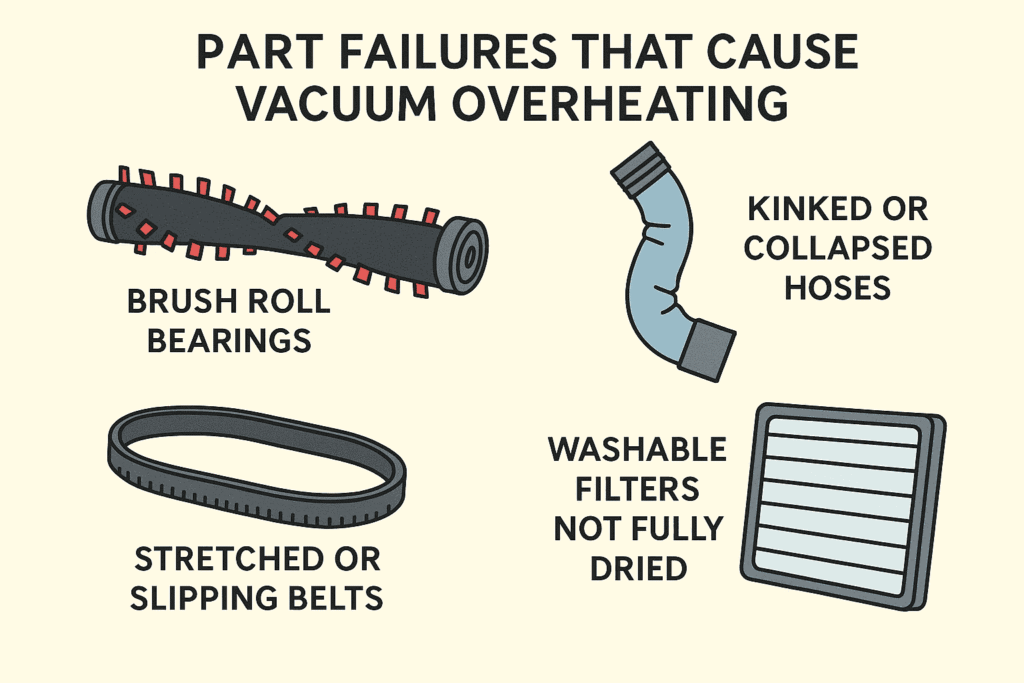
If cleaning the airflow path does not solve the issue, check these parts:
- Stretched or slipping belts that cause brush drag
- Brush roll bearings packed with hair
- Hoses with kinks, soft spots, or partial collapses
- Filters that never fully dried after washing
Parts suppliers note that Bissell belts, hoses, and brush rolls are usually inexpensive, which keeps repairs practical unless the motor has overheated multiple times.
See other common Bissell issues and their fixes here.
Cost Expectations and When To Repair
Most overheating problems are inexpensive to fix:
- Belt and brush cleaning: very low cost
- New filter set: low cost
- Replacement hose: moderate cost, still far cheaper than replacing the vacuum
If the vacuum still shuts down after all airflow issues are solved, the thermal protector or motor may be worn. On budget models like the CleanView Rewind or PowerLifter Swivel, motor replacement often exceeds the value of the vacuum. On newer or higher-end units like SurfaceSense Pet or Pet Hair Eraser Turbo, trying basic parts first is still cost effective.