

| Symptom | Likely Cause | First Test |
|---|---|---|
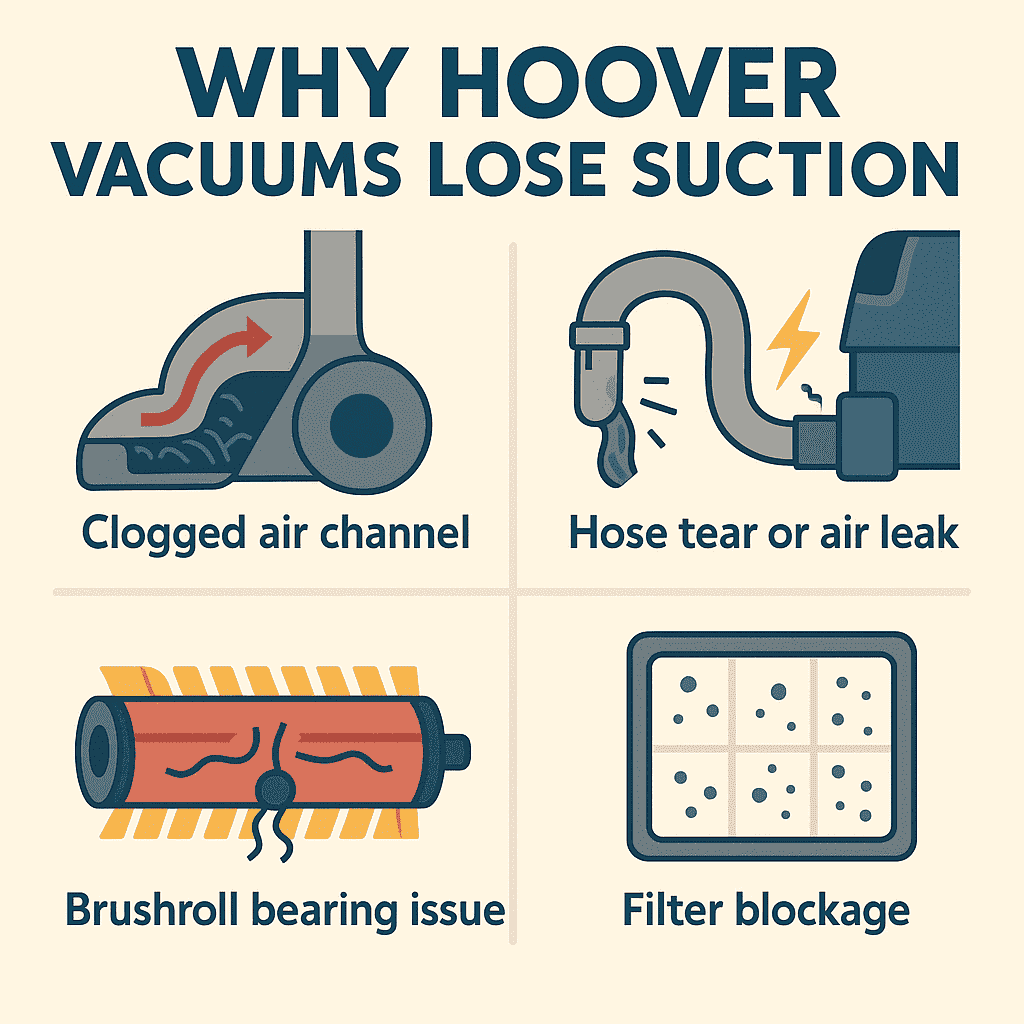
| Weak carpet pickup | Clogged lower air channel | Inspect base and airway behind brushroll |
| Strong motor noise but poor suction | Torn or leaking hose | Stretch hose and feel for air leaks |
| Bare floors clean but carpets stay dirty | Worn brushroll bearings | Spin brushroll by hand and check for grinding |
| Vacuum shuts off or smells hot | Severe filter blockage | Remove both filters and test airflow |
Early Symptoms Owners Notice
Loss of suction in Hoover vacuums, especially WindTunnel and ONEPWR models, tends to show up gradually. Some owners say the machine still picks up surface debris but leaves behind sand or grit in carpets. Others notice the vacuum sounding louder without actually cleaning better. In several units I have opened, the airflow is restricted long before the motor shows signs of wear. Click here to see how many years you should get out of your Hoover Vacuum.
Why this failure happens
Hoover uprights use a multi-path airflow system. When any part of it clogs, the vacuum loses suction at the nozzle even if the motor is still strong. Technicians often mention three main contributors.
First is a blockage in the lower air channel, usually caused by hair, paper, or pet debris packing tightly near the base plate. Second is a failing brushroll bearing, which reduces agitation and makes it seem like suction is weak. Third is a collapsed or partially torn hose. A small tear can make the system pull in air from the leak instead of the carpet.
What to check first
Start with the lower intake channel. Flip the vacuum over, remove the bottom plate, and check the airway behind the brushroll. On models like the WindTunnel 3 High Performance this area tends to clog in a predictable spot. Remove compacted debris with a screwdriver or long brush.
Next, inspect the hose. Stretch it fully and look for cracks, soft spots, or flattening. If the hose collapses when the vacuum is turned on, it should be replaced.
Finally, check the filters. Hoover washable filters clog easily, especially in homes with fine dust. A clogged filter reduces overall airflow and forces the motor to work harder.
Part failures that trigger this problem
Repair shops commonly see damaged hoses on the WindTunnel and MAXLife families. These hoses soften with heat and age. Brushroll bearings are another frequent failure point. When bearings seize, the brush stalls, and debris never enters the intake path. Parts suppliers note that replacement hoses and brushrolls for most Hoover models are inexpensive and widely available. Click here to see repair costs for this issue on Hoover Vacuums.
When Repair Makes Sense
Loss of suction is almost always repairable. Hoses, filters, brushrolls, and lower-airway cleanouts are all low-cost fixes. If the vacuum is from the ONEPWR line and the motor starts to pulse or surge, it may indicate a deeper issue with the power module, and repair becomes less cost effective. For most corded Hoovers, though, restoring suction is straightforward and worth doing. Click Here to Learn About the Best Vacuum Brands for Longevity if you are looking to replace your unit.
Model Family Notes
This problem is most commonly reported in the Hoover WindTunnel 3 High Performance, MAXLife Pro Pet, and ONEPWR Evolve lines. These models rely heavily on clean airflow paths, so even a small clog or hose issue shows up quickly.
Preventive Tips
Clean the lower channel every month if you vacuum carpet frequently. Replace filters on schedule, especially the pre-motor filter. Avoid vacuuming damp debris, which accelerates hose wear. Hoover provides maintenance guides on their support pages: https://www.hoover.com/
For visual help, the repair walkthroughs on PartsDr and RepairClinic can clarify hose and brushroll replacement.